







In 2026, the landscape of Search Engine Optimization has shifted from surface-level keyword optimization to deep-rooted technical health. Conducting a comprehensive Technical SEO Audit 2026 is now the primary requirement, as Google’s algorithms have become highly sophisticated, moving beyond mere content relevance to prioritize Technical Integrity and user-centric performance.
If your website is technically flawed, even the most exceptional content will struggle to rank. This guide provides a detailed, step-by-step framework for a Technical SEO Audit 2026 that aligns with Google’s current standards, focusing on transparency, speed, and logical structure. We will bypass the outdated tactics and focus on building a robust technical foundation that commands trust from both users and search engines.
Why Technical Integrity is the New Ranking Standard
The concept of technical integrity goes beyond just having a clean codebase. It encompasses how a website functions, how easily it can be understood by search engines, and the quality of experience it provides to the user. In the early days of SEO, rankings were often influenced by factors that could be easily manipulated. Today, Google’s systems are designed to identify and reward websites that genuinely serve the user’s need with efficiency and security.
An effective SEO audit in 2026 is a critical examination of your site’s pulse. It’s about identifying frictional points—technical barriers that prevent search engines from crawling and indexing your content, and usability issues that cause users to abandon your site. When you fix technical errors, you are not just checking off a list; you are building trust with the algorithm. A site with high technical integrity is transparent, which reduces the resources Google needs to spend processing your pages. This investment in performance is what Google terms ‘user-focused optimization,’ and it is the only sustainable path to long-term search visibility.
The Foundation: Mastering Crawlability and Indexing
Crawlability and indexing form the bedrock of your SEO efforts. If Google cannot efficiently find and process your pages, they will never appear in search results. This phase focuses on optimizing your site’s relationship with search engine bots.
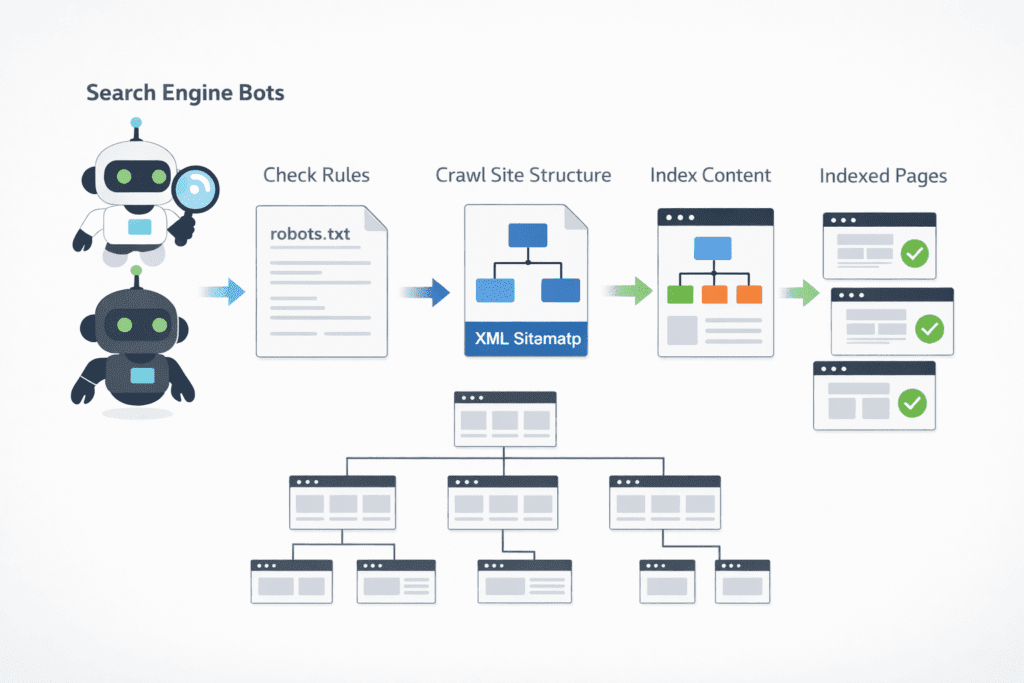
The Robots.txt File: Directing the Gatekeeper
A common misconception is that robots.txt is for security. It is not. It is a set of instructions for search engine crawlers. A flawed robots.txt can inadvertently block critical areas of your site.
- Audit for Blocks: Check if you are accidentally blocking access to your /scripts/, /images/, or /css/ directories. Google bots need to render your pages completely to understand their layout and functionality. Blocking these assets prevents full rendering.
- Handle Low-Value Pages: Use robots.txt to guide crawlers away from low-value areas that don’t need to be indexed, such as /wp-admin/ or internal search results pages (/search?q=). This preserves your crawl budget for high-priority pages.
Expert Insight: The ‘Crawl vs. Index’ Paradox Never use robots.txt to block a page that already has a noindex tag. If Googlebot is blocked from crawling the page, it can never “see” the noindex instruction, meaning the page might stay in search results indefinitely. Always allow crawling so Google can process your indexing directives.
XML Sitemaps: Providing a Definitive GPS for Bots
Your XML sitemap should not include every single URL on your site. It should only contain the pages that are crucial for search visibility.
- Status Check: Your sitemap should consist only of 200 OK status pages. Remove all 404 errors, 301 redirects, and pages with a noindex meta tag. Including these is a direct waste of crawl budget.
- Scale and Categorization: For large websites (over 50,000 URLs), a single sitemap is insufficient. Split your sitemap by content type (e.g., sitemap-products.xml, sitemap-blog.xml). Smaller, focused sitemaps help Google understand your site structure and update index frequency more efficiently.
The 3-Click Rule: Flattening Structure for Maximum Impact
Crawl depth is the number of clicks required to reach a specific page from the homepage. A deep structure is a sign of poor hierarchy.
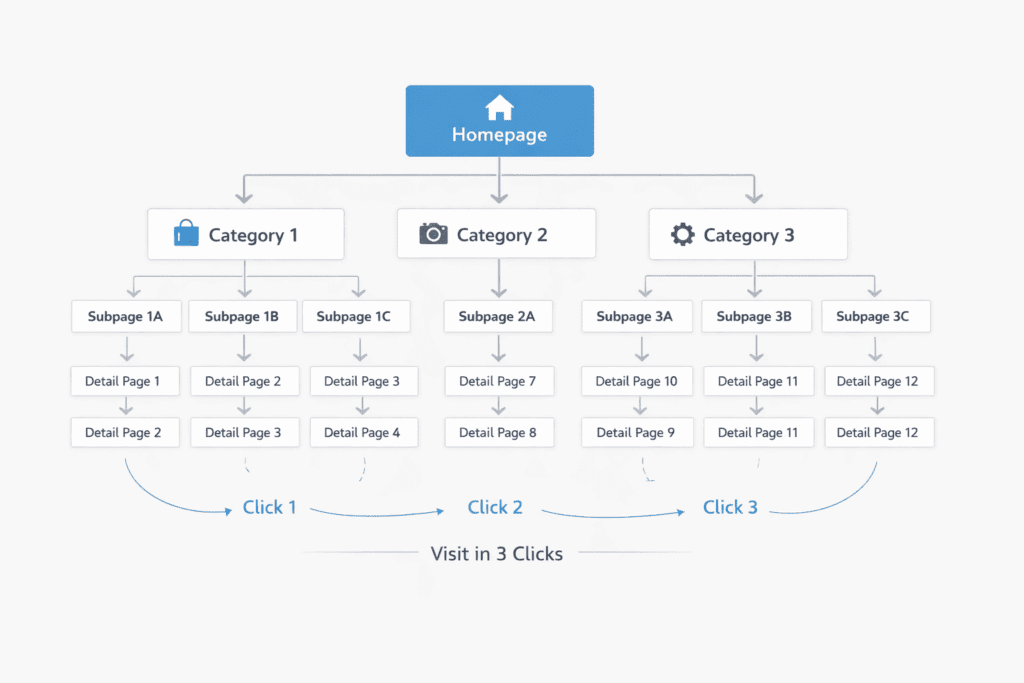
Practical Case: Consider an e-commerce site where the “Best Sellers” page is six clicks away from the homepage. Google’s algorithms will perceive this page as less important because of its distance from the root.
The Objective: Aim to keep every high-priority page within a maximum of three clicks from the homepage. Utilize a clear navigational menu, breadcrumbs, and strategic internal links to flatten your structure.
Core Requirements for Site Hierarchy:
- Flat Architecture: Ensure your primary “money pages” are accessible within 3 clicks from the homepage.
- Breadcrumb Navigation: Implement clear breadcrumbs to distribute link equity and help bots understand parent-child relationships.
- Internal Link Density: Audit your footer and sidebar links to ensure high-priority content receives constant internal authority.
Optimizing the Crawl Budget: Eliminating Resource Leaks
Google does not have unlimited resources for your site. The Crawl Budget is the time and number of pages Googlebot will spend on your site in a given period. It is precious.
- Duplicate Content & Filters: Faceted navigation (filters for size, color, price) can generate millions of thin, duplicate URLs. For example, site.com/shoes?color=blue&size=10 is likely identical to site.com/shoes?size=10&color=blue.
- Faceted Navigation Solutions: Use canonical tags to point filtered pages to the master category page. Alternatively, configure how Google handles specific URL parameters within Google Search Console to specify which ones don’t change the page content.
The User’s Lens: Auditing Core Web Vitals and Performance
Core Web Vitals are a set of metrics that Google uses to evaluate user experience. They measure visual load, interactivity, and visual stability. In 2026, the focus has shifted from mere existence of CWV to a nuanced understanding of their impact on retention.
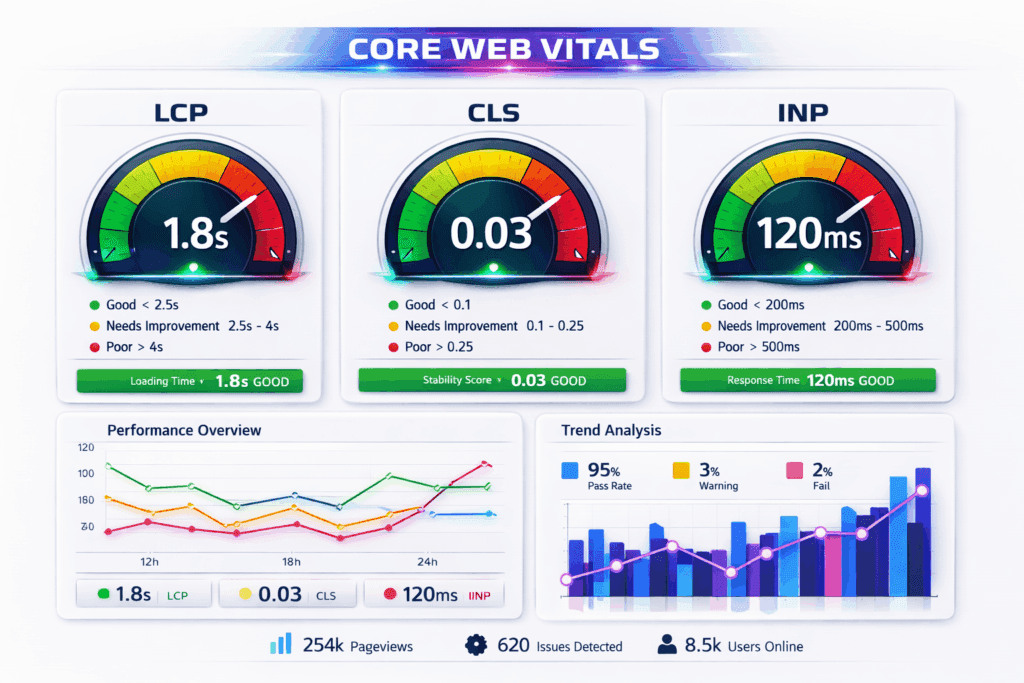
Visual Load and Stability: LCP and CLS
- LCP (Largest Contentful Paint): Measures how quickly the main content on a page becomes visible. This should happen within 2.5 seconds. A slow LCP is often caused by unoptimized hero images, slow server response times, or blocking JavaScript.
- CLS (Cumulative Layout Shift): Measures whether page elements shift unexpectedly as they load. A CLS score under 0.1 is ideal. Common causes include images without defined dimensions and dynamic content inserted above existing content.
The New Interactivity Paradigm: Interaction to Next Paint (INP)
With the phasing out of First Input Delay (FID), INP (Interaction to Next Paint) has become the definitive metric for interactivity. It measures the time from when a user interacts (e.g., clicks a button) to the point where the browser can actually render the next frame. It is about perceived responsiveness.
- Audit for Lag: Analyze pages with complex forms, dynamic filtering, or heavy JavaScript. Use Chrome DevTools (the Performance tab) to identify long-running tasks.
- The INP Fix: Break up long JavaScript tasks into smaller chunks. Defer non-essential scripts. Optimize event handlers so they execute faster, providing the user with immediate visual feedback.
The Silo Strategy: Architecture and Contextual Linking
A logical site structure is not just good for users; it provides critical contextual signals to Google. Your audit must ensure that your internal linking is deliberate and supportive.
Building a “Silo Structure” for Topical Authority
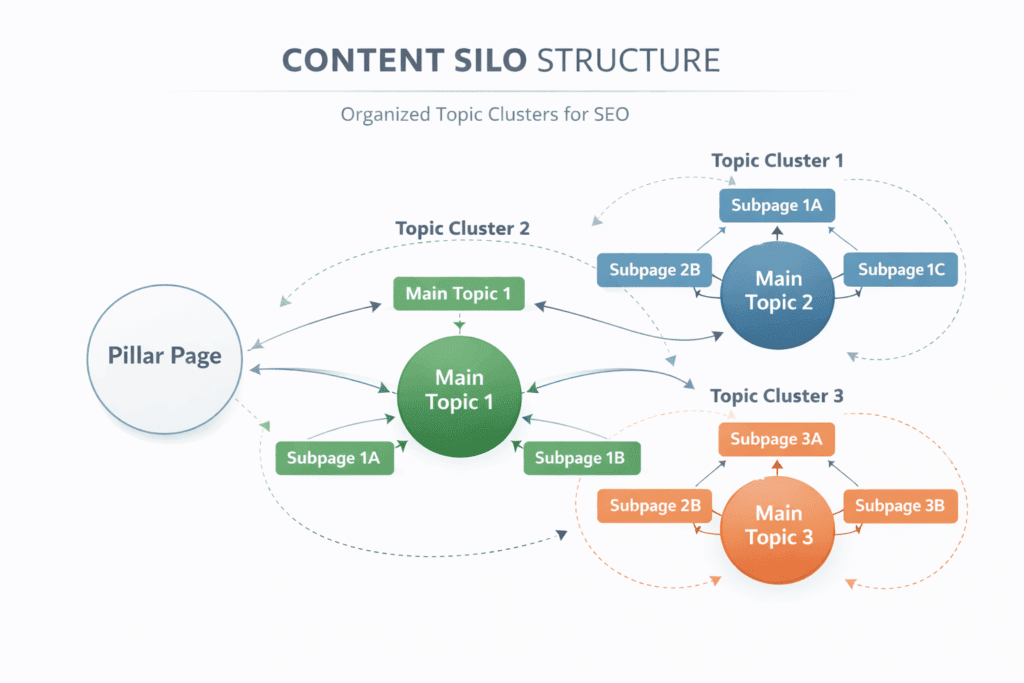
A silo structure organizes your website’s content into distinct categories, or ‘silos’. This builds thematic relevance for those topics.
- Implementation: A top-level category page should link to nested service pages, which link back up. This keeps relevance tight and helps you build a Topical Authority SEO Guide 2026.
- The 3-Click Rule vs. Reality: While flattening the structure is good, logical grouping is paramount. If your structure is too flat, context is lost. Focus on strong topical coherence rather than a pure mathematical click count.
Descriptive Internal Linking: Moving Beyond “Click Here”
The anchor text you use for internal links provides a powerful signal to Google about the destination page’s content.
- Be Descriptive: Avoid non-descriptive anchor text like “Click Here” or “Read More.” Instead, use contextually relevant phrases like “learn about technical SEO audits.”
- Analyze Link Distribution: Do your high-priority pages have the most internal links? Many sites over-link to a ‘Contact Us’ page while their core service pages remain underserved.
Modern Standards: Mobile-First Excellence and Accessibility
Google indexes the mobile version of your site, not the desktop version. Your mobile site is your actual site for ranking purposes. Accessibility is also directly tied to usability.
The Mobile Integrity Audit
- Parity: Ensure that all critical content, images, and structured data present on your desktop version are also visible on the mobile version. Hiding content on mobile is a significant risk.
- Layout: Audit for touch target size (buttons too close together) and viewport issues. Elements that require horizontal scrolling are a critical error.
Accessibility as a Quality Signal
While not a direct ranking factor in the same way CWV is, an inaccessible site will have poor engagement metrics (high bounce rate, low time on site), which signals low quality.
- Alt Text: Ensure every meaningful image has descriptive alt text. This provides context for visually impaired users and for Google Images.
- Contrast and Hierarchy: Audit for text contrast against the background. Use proper heading hierarchy (H1, H2, H3) to structure your content, making it easier for screen readers (and bots) to navigate.
Content Integrity: Managing EEAT and Quality Control
Technical audit doesn’t mean ignoring content. We must audit content for technical flaws like duplicate content or poor quality signals. Google’s E-E-A-T (Experience, Expertise, Authoritativeness, Trustworthiness) guidelines are critical.
Eliminating Keyword Cannibalization
This occurs when multiple pages on your site target the same keyword and search intent. Google gets confused about which page to rank, often ranking neither.
- Fixing Cannibalization: Merge weak pages, redirect duplicates, or differentiate the content to target a specific Search Intent SEO Strategy 2026.
- Merge: Consolidate the content of weak pages into one strong page.
- Redirect: Point weaker duplicate pages to the main authoritative page.
- Differentiate: Adjust the content of one page to target a different search intent.
The “Helpful Content” Check and EEAT Signals
Thin content (low word count with little value) can drag down the perception of your entire site’s quality.
- Actionable Content: Google rewards pages that leave a user ‘satisfied.’ Ensure your site displays clear Google E-E-A-T Guide in 2026 signals like author bios and transparent contact information. Use Google Search Console (GSC) to find pages with high impressions but very low click-through rates (CTR). These are often “thin” or not answering the intent.
- EEAT Signals: Ensure author bios are present for medical, legal, or financial topics. Audit for clear disclosure pages, contact information, and terms of service. Trust is technical.
The Content Quality Checklist:
- Does this page satisfy a specific Search Intent?
- Is the author’s E-E-A-T (Expertise) clearly visible via a bio or credentials?
- Have you checked for Keyword Cannibalization against existing pages?
- Is the content “Helpful” enough to leave the user satisfied without returning to the search results?
Under-the-Hood Fixes: Schema, Security, and Redirects
These are the unseen but vital components of technical integrity.
Schema Markup: Speaking Google’s Language
Schema markup (structured data) helps Google understand the specific content on your page, allowing for rich snippets (reviews, product prices, FAQ boxes) in search results.
- Validation: Use Google’s Rich Results Test tool to check your existing Schema. Common errors include missing required fields (e.g., product image or price) or targeting an incorrect Schema type (using ‘Article’ when it’s a ‘BlogPosting’).
- Prioritize Entities: Make sure you have structured data for essential entities like Organization, Product, and Article.
Security and Protocol Integrity
- HTTPS/SSL: Google has treated HTTPS as a signal for years. Your site must be fully secure, with all resources (images, scripts) loading over HTTPS to avoid ‘mixed content’ warnings.
- Redirect Chains: A chain occurs when page A redirects to B, which redirects to C. This adds unnecessary latency for users and search engine bots. Every redirect should be a direct, single step (A to C). Audit for this using a crawler like Screaming Frog.
Technical Alert: Mixed Content Errors Simply having an SSL certificate is not enough. You must audit your site for “Mixed Content”—instances where images or scripts are still being called via http:// instead of https://. This triggers browser security warnings and negatively impacts your Technical Integrity score.
Case Study: Recovering from an Indexing Crisis
Consider a mid-sized e-commerce site specializing in home goods. A sudden site redesign in 2025 resulted in a 25% drop in organic traffic over two months. Their initial analysis focused on content and backlinks, which appeared stable. A technical SEO audit was then conducted, revealing a critical crawlability error.
The audit discovered that the robots.txt file had been misconfigured during the staging-to-live migration, accidentally blocking the /product-images/ directory. Since Googlebot could not render the product pages fully, it perceived them as low-quality. The audit also identified a massive faceted navigation issue that was burning 60% of their crawl budget on thin pages.
The Fix: The robots.txt was immediately updated to allow access to image directories. Canonical tags were then implemented on all faceted navigation URLs to point to the main product category pages. Within four weeks, Google Search Console showed a significant increase in valid, indexed URLs. By the eighth week, organic traffic had recovered, ultimately achieving a 40% increase from their pre-redesign baseline. This recovery was entirely technical; no new content or backlinks were added.
Expert Insights: Advanced SEO Audit FAQ
1. Does fixing a large number of 404 errors immediately boost rankings?
No, not directly. A 404 error itself is not a negative ranking factor; Google expects them when pages are deleted. However, a site with thousands of 404s signals a poorly maintained site. Fixing them (by redirecting valuable dead links) recaptures lost internal link equity, which does help rankings.
2. How should I handle faceted navigation for SEO?
For most e-commerce sites, the best approach is to block filtered URLs from being indexed. Use canonical tags pointing back to the category page or use Google Search Console parameters to specify that these filters are for sorting only.
3. Why is my Sitemap not indexing?
A sitemap is a recommendation, not a command. Google might not index your sitemap if it is cluttered with 404s, 301s, or non-canonical URLs. If Google views your sitemap as unreliable, it may ignore it entirely.
4. How do I measure INP?
You can measure INP using Google Search Console’s Core Web Vitals report or via PageSpeed Insights. For real-time data, use Chrome DevTools’ Performance panel.
5. Can I do a technical audit on a budget?
Yes. Google Search Console is free and powerful. Combine it with the free version of Screaming Frog (up to 500 URLs) and PageSpeed Insights for a solid initial audit.
6. What is the most common technical error?
Keyword Cannibalization and flawed internal linking are extremely common. Often, websites simply lack a single master page for their core keywords.
7. How often should I audit my site?
A deep technical audit should be done at least annually, or immediately after a major design change or CMS migration. Quarterly maintenance checks are recommended.
8. Do H1 tags affect performance?
H1 tags are on-page SEO. They provide a structural signal about the page’s topic. While an optimized H1 helps Google understand relevance, it is not a direct speed or load metric.
9. Are noindex tags better than Robots.txt blocks?
They serve different purposes. A robots.txt block prevents Google from ever crawling the page. A noindex tag allows Google to crawl but prevents it from indexing. For duplicate content, canonicals are usually the best choice, but noindex is effective for private staging URLs.
10. Does fixing speed errors help all pages on my site?
Yes. Google’s core web vitals and overall site speed metrics can influence the entire domain’s perception. A faster site improves the user experience universally, which leads to better engagement signals that Google values.
The Ultimate Technical Integrity Checklist
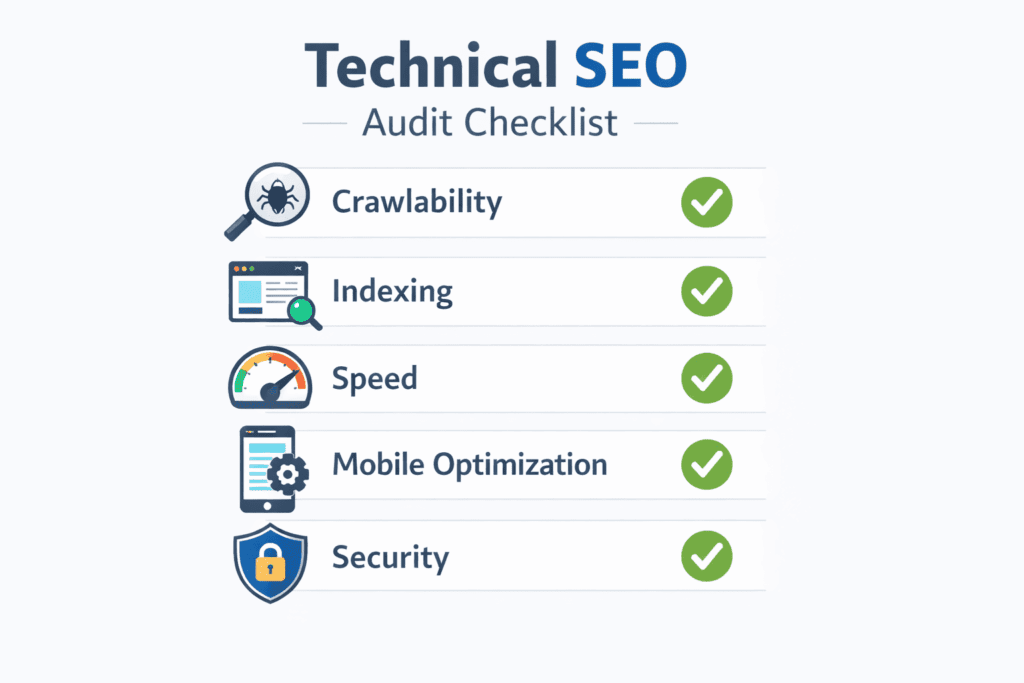
The Bottom Line for 2026: Technical SEO is no longer about “tricking” an algorithm; it is about removing friction for the user. A technically sound website signals to Google that your brand is professional, reliable, and worthy of a top-tier ranking.
This table summarizes the action items discussed in this guide.
| SEO Pillar | Action Item | High-Level Tool |
| Crawlability | Check Robots.txt for accidental blocks to JS/CSS/Images | Google Search Console / Screaming Frog |
| Indexing | Ensure XML Sitemap contains only 200 OK canonical URLs | GSC Sitemaps Report |
| Structure | Verify all high-priority pages are within 3 clicks from Homepage | Screaming Frog / Internal Link Analysis |
| Speed/Perf | Achieve LCP < 2.5s, CLS < 0.1, and INP < 200ms | PageSpeed Insights / GSC CWV Report |
| User Exp | Audit for touch targets, visual stability, and pop-up friction | PageSpeed Insights / Chrome DevTools |
| Mobile | Content parity check: mobile vs. desktop | Google Mobile-Friendly Test (obsolete, use GSC Page Experience) |
| Internal Link | Use descriptive anchors; prioritize high-value pages | Screaming Frog |
| Content Quality | Consolidate duplicate content or use canonical tags | Ahrefs / GSC Performance |
| Schema | Use Rich Results Test on Organization, Product, Article types | Rich Results Test tool |
| Security | Find and fix mixed content and 301 redirect chains | Screaming Frog |
Maintaining Technical Excellence with BizSmartTools
Technical SEO is not a “set-and-forget” task; it is an ongoing commitment to quality and performance. As search engines continue to evolve in 2026, the websites that prioritize user experience and technical integrity will consistently outperform the competition.
At BizSmartTools, we are dedicated to decoding these complex algorithmic shifts and providing you with the actionable insights needed to maintain a competitive edge. Use this guide as your operational roadmap to ensure your website remains fast, accessible, and authoritative.
For more deep-dives into modern search strategies and performance optimization, stay connected with the latest expert resources at BizSmartTools.com.



0 Comments