






Let’s be real for a second: starting a business in 2026 is exhausting. You have a vision, a messy desk, and a bank account that seems to shrink every time you look at it. One of the biggest traps I see founders fall into—and I’ve seen a lot of them in my decade as a consultant—is the “Enterprise Trap.”
You think you need the $200-a-month CRM or the $150-a-month project management suite because that’s what the “big guys” use. But for a startup, every dollar spent on a bloated software subscription is a dollar taken away from your product or your team.
The truth is, you do not need the most expensive tools; you need the smartest ones. You need software that works together, scales with you, and—most importantly—doesn’t require a CFO’s approval to buy. In this guide, I’m breaking down the absolute best budget tools for startups that actually move the needle. No fluff, no filler apps—just the stuff I’d tell my own brother to use if he were launching a business tomorrow.
Quick Comparison: Budget vs. Expensive Tools
Before we dive into the details, here is a snapshot of how the industry heavyweights stack up against the budget-friendly alternatives I recommend for 2026.
| Category | “Industry Standard” (Expensive) | Recommended Budget Alternative | Why the Budget Tool Wins |
| Website | Webflow ($23+/mo) | Framer | Design-first, faster build time, $5/mo tier. |
| CRM/Sales | Salesforce ($150+/mo) | folk CRM | Zero data entry; feels like a smart spreadsheet. |
| Forms | Typeform ($35+/mo) | Tally.so | 99% of features are free; no paywalls for logic. |
| Scheduling | Calendly ($12/mo) | TidyCal | One-time $29 fee for life. No subscriptions. |
| SEO | Ahrefs ($99+/mo) | SE Ranking | Full suite for ~50% of the price. |
| Automation | Zapier ($20+/mo) | Make.com | Visual builder; 10x more tasks for less money. |
| Marketing | Mailchimp ($20+/mo) | beehiiv | Built-in growth tools and massive free tier. |
1. Website & Design Tools
Your website is your 24/7 salesperson. If it looks like it was built in 2005, people won’t trust you. But you also shouldn’t be spending $5,000 on a web developer for a simple landing page.
Framer
Framer has completely changed the game for startup websites. It feels like designing in Figma (a popular design tool), but when you hit “Publish,” it’s a live, high-performance website. It’s perfect for SaaS companies that need that “polished” tech look.
- Key Features:
- Figma-to-HTML: You can literally copy your designs from Figma and paste them into Framer.
- AI Site Generation: Describe your site, and it builds a starting layout for you in seconds.
- Built-in CMS: Easily manage a blog or a “Team” page without touching code.
- Who should use it: Founders who want a “premium” looking site without hiring a developer.
- Real-life use case: A small AI startup used Framer to build their landing page in a weekend. They used a pre-made template, tweaked the colors, and had a site that looked like they spent $10k on a design agency.
- Official Website: Visit Framer
Pricing: * Free: Great for testing.
- Mini: $5/month (Simple sites).
- Basic: $15/month (For professional startups with a custom domain).
(Note: Prices may vary; please check their official website for current rates.)
| Pros | Cons |
| Best-in-class design flexibility | Steeper learning curve than Carrd |
| Extremely fast loading speeds | CMS can feel limited for huge sites |
| No coding required at all | Pricing jumps quickly as you add features |
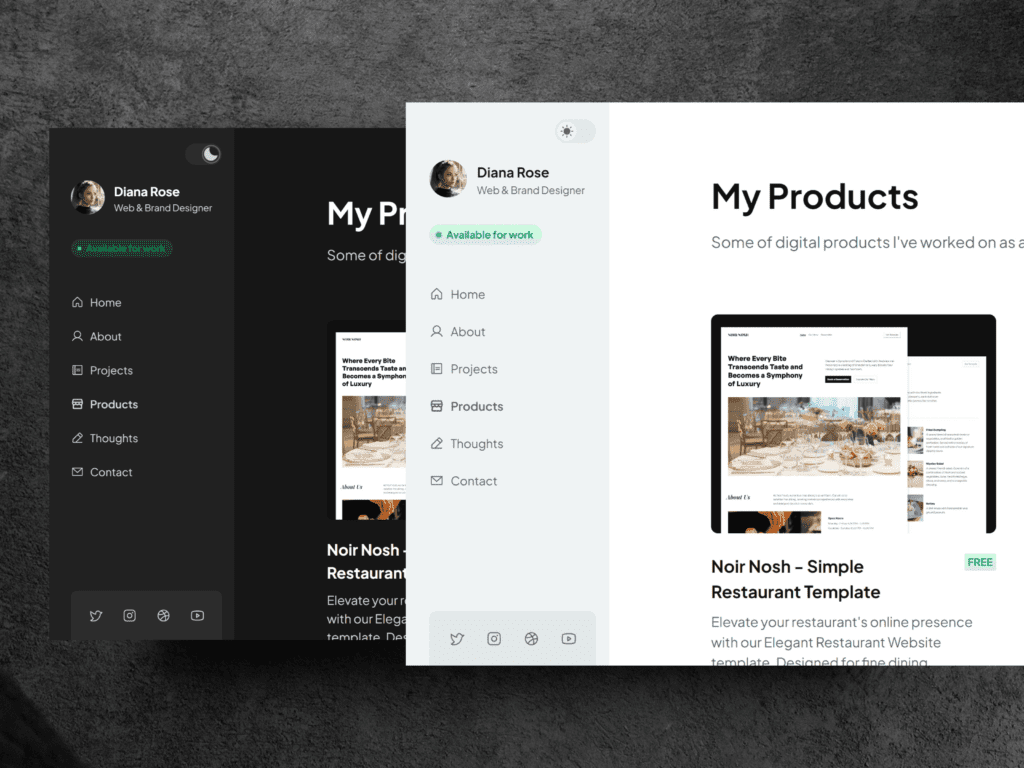
Carrd
If Framer is a power tool, Carrd is a Swiss Army knife. It’s specifically for one-page websites. If you just need a landing page to collect emails or show off a portfolio, this is the cheapest, fastest way to do it.
- Key Features:
- Who should use it: Solopreneurs, people testing a “waitlist” for a new idea, or simple service businesses.
- Official Website: Visit Carrd
- Real-life use case: A freelancer I know used Carrd to build a “link in bio” site that also doubled as a lead capture form. It took 30 minutes to set up and costs her less than $20 a year.
Pricing: * Free: Basic features.
- Pro: Starts at $19/year (Yes, per year)
(Note: Prices may vary; please check their official website for current rates.)
| Pros | Cons |
| Incredible value for money | Limited to one-page sites |
| Very fast to set up | Limited “fancy” animations |
| Extremely easy for beginners | Not great for long-term SEO/blogs |
2. Marketing & CRM Tools
A CRM (Customer Relationship Management) tool is just a fancy way of saying “a place to keep track of who you’re talking to.” Most startups don’t need Salesforce; they need something they’ll actually use.
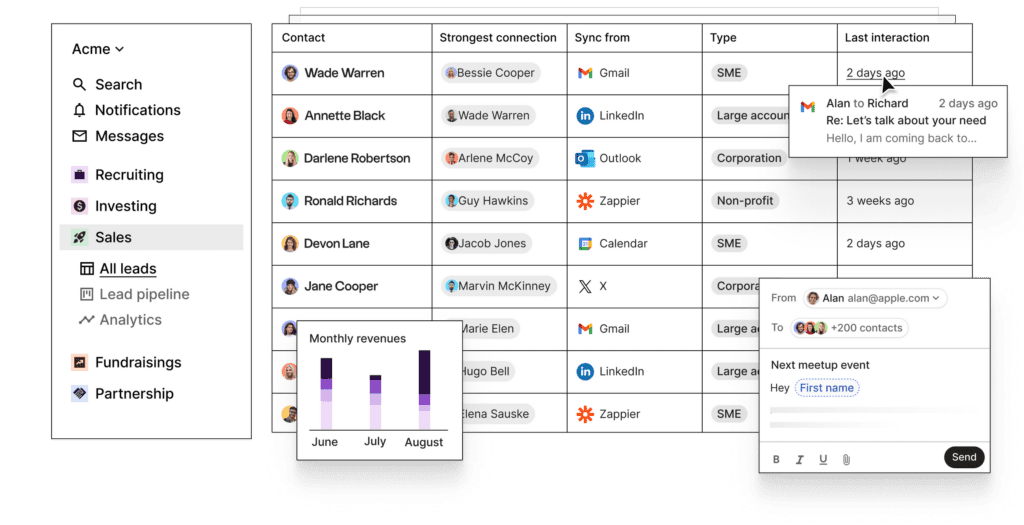
folk CRM
I often call folk the Notion of CRMs. It doesn’t feel like a boring database; it feels like a modern workspace. It’s designed for teams who live in their email and on LinkedIn.
- Key Features:
- Chrome Extension: Add people to your CRM directly from LinkedIn or Gmail with one click.
- Magic Fields: Uses AI to summarize contacts or draft personalized emails.
- Shared Pipelines: Your whole team can see where a deal stands.
- Who should use it: Founders doing their own sales or small teams (1-10 people).
- Official Website: Visit folk
- Real-life use case: A B2B founder used folk to track 100 potential investors. They used the Chrome extension to pull data from LinkedIn and the “Mail Merge” feature to send personalized updates, raising their seed round in half the time.
Pricing: * Free: Up to 100 contacts.
- Standard: $18/month (Billed annually).
(Note: Prices may vary; please check their official website for current rates.)
| Pros | Cons |
| Beautiful, clean interface | Not built for massive call centers |
| Best LinkedIn integration on the market | Can get pricey as contact list grows |
| Very low “data entry” required | Reporting is basic compared to HubSpot |
Bigin by Zoho
If you want a “traditional” CRM that’s stripped down to be fast and cheap, Bigin is it. It’s made by Zoho, so you know the tech is solid, but it’s built specifically for small businesses.
- Key Features:
- Pipeline View: A classic “drag and drop” board for your deals.
- Built-in Telephony: Make calls directly from the app.
- Mobile App: One of the best CRM apps for founders on the go.
- Who should use it: Traditional small businesses or startups that prefer a “classic” sales process.
- Real-life use case: A small solar panel installation startup uses Bigin to track leads from their website through to the final contract. It keeps their small sales team organized without the complexity of a bigger system.
- Official Website: Visit Bigin
Pricing: * Free: Up to 500 contacts.
- Express: $7/month (Incredible value).
(Note: Prices may vary; please check their official website for current rates.)
| Pros | Cons |
| Extremely affordable | The UI feels a bit “corporate” |
| Seamless upgrade path to Zoho CRM | Limited marketing automation |
| Great mobile app experience | Customization has its limits |
3. SEO & Content Tools
SEO (Search Engine Optimization) is a long game, but if you start now, you’ll get “free” traffic for years. You don’t need to pay $100/month for Ahrefs yet.
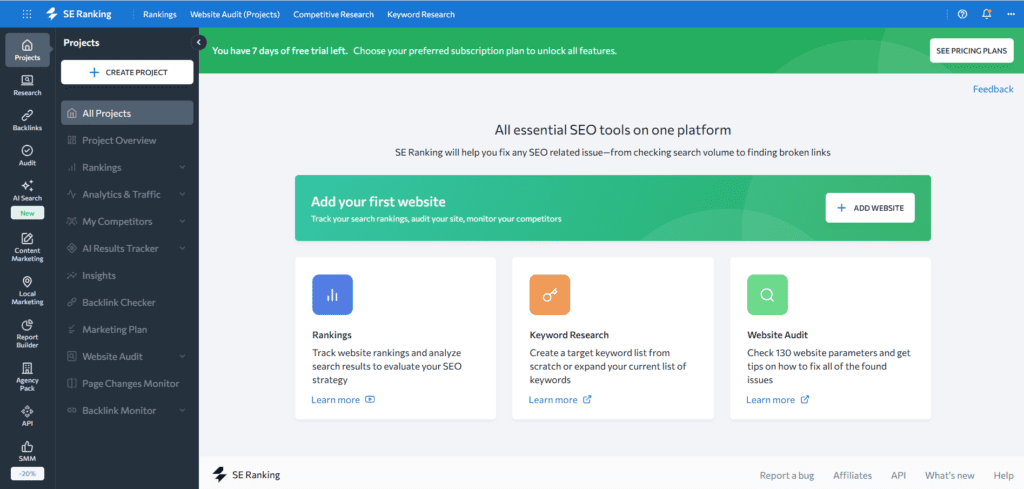
SE Ranking
SE Ranking is the “best value” all-in-one SEO tool. It does almost everything the expensive tools do (keyword research, backlink checking, site audits) for about half the price.
- Key Features:
- Keyword Tracker: See exactly where you rank on Google every day.
- Competitor Analysis: Peek at what keywords your competitors are paying for.
- AI Content Briefs: Helps you write articles that actually have a chance of ranking.
- Who should use it: Content-heavy startups or founders trying to grow organic traffic on a budget.
- Real-life use case: A blog-focused startup used SE Ranking to find “low competition” keywords their competitors missed. They grew their traffic by 300% in six months by focusing on these “hidden gems.”
- Official Website: Visit SE Ranking
Pricing: * Essential: Around $52/month (Still a bit of an investment, but the best “all-in-one” value).
(Note: Prices may vary; please check their official website for current rates.)
| Pros | Cons |
| Huge feature set for the price | Interface is a bit cluttered |
| Very accurate keyword data | Lower-tier plans have limits on reports |
| Great for local SEO tracking | Smaller backlink database than Ahrefs |
Mangools (KWFinder)
If SE Ranking feels too complex, Mangools is the “beginner-friendly” alternative. It’s famous for having the most beautiful and easy-to-read SEO interface.
Official Website: Visit Mangools
- Key Features:
- KWFinder: One of the easiest tools to find “easy” keywords.
- SERPWatcher: A very simple way to track your rankings.
- SiteProfiler: Quickly check the “authority” of any website.
- Who should use it: Beginners who find SEO tools intimidating
- Real-life use case: An e-commerce store owner uses KWFinder once a week to find “long-tail” keywords (like “best organic dog treats for puppies”) to write quick product descriptions that rank.
Pricing: * Entry: $19/month (Billed annually).
(Note: Prices may vary; please check their official website for current rates.)
| Pros | Cons |
| Most beginner-friendly UI | Not enough for “hardcore” SEO pros |
| Very fast and lightweight | Limited site audit features |
| Great “Keyword Difficulty” score | You have to switch between 5 different apps |
4. Content Creation Tools
In 2026, you can’t just post text. You need graphics and video. Luckily, the tools for this have become incredibly powerful and cheap.
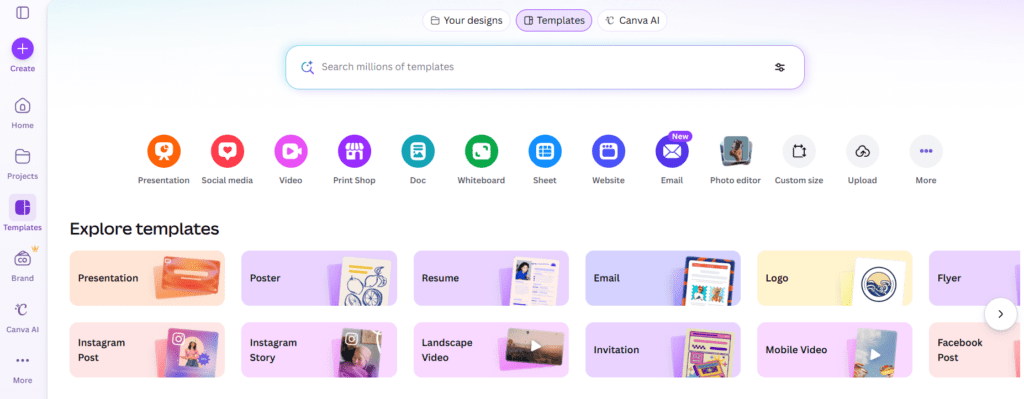
Canva
You probably know Canva, but are you using it for your startup’s “Brand Kit”? It’s more than just making a quick Instagram post; it’s about keeping your whole company’s look consistent on a budget.
Official Website: Visit Canva
- Key Features:
- Magic Studio: AI tools that can remove backgrounds, “expand” photos, or even generate images from text.
- Brand Kit: Save your logos, fonts, and colors so every employee uses the right ones.
- Video Editor: Surprisingly good for simple social media ads and “explainer” videos.
- Who should use it: Everyone. Literally every startup should have a Canva account.
- Real-life use case: A non-designer founder uses Canva to create professional-looking investor decks. Instead of hiring a designer for $50/hour, they use a $15/month Pro account and a template.
Also Read this article : Canva Beginner Guide 2026 — Step-by-Step Design Tutorial for Beginners
Pricing: * Free: Very generous.
- Pro: $15/month (Unlocks the best AI tools and Brand Kit).
(Note: Prices may vary; please check their official website for current rates.)
| Pros | Cons |
| Zero design skill required | Hard to do “custom” complex illustrations |
| Massive library of free assets | Everyone uses the same templates |
| Great collaboration features | Desktop app can be slow with large files |
CapCut
If you’re doing video (TikTok, Reels, or YouTube), CapCut is the king of budget tools. It’s owned by ByteDance (the TikTok people), so it has all the “trending” features built-in.
Official Website: Visit CapCut
- Key Features:
- Auto-Captions: It transcribes your video and adds stylized captions automatically. This is a huge time-saver.
- Background Removal: Remove the background of a video with one click (no green screen needed).
- Huge Sound Library: Access to all the trending music and sound effects.
- Who should use it: Any startup doing video marketing or social media.
- Real-life use case: A SaaS company uses CapCut to turn their 30-minute webinar recordings into 10 “bite-sized” clips for LinkedIn. Each clip takes about 5 minutes to edit.
Pricing: * Free: Most features are free (and there’s no watermark on the mobile app!).
- Pro: Around $8/month (For extra effects and cloud storage).
(Note: Prices may vary; please check their official website for current rates.)
| Pros | Cons |
| Best auto-captioning in the industry | Privacy concerns for some businesses |
| Extremely easy to learn | Not for professional “film-grade” editing |
| Great mobile and desktop apps | Limited advanced color grading |

5. Automation & Productivity Tools
The goal of a startup founder is to automate themselves out of a job. If you’re doing the same task twice, a tool should probably be doing it for you.
Make (Integromat)
Zapier is the famous one, but Make is the one smart founders use. It’s more visual, more powerful, and significantly cheaper if you have a lot of “tasks” running.
Official Website: Visit Make
- Key Features:
- Visual Builder: You see your data moving through “bubbles” on a map.
- Complex Logic: You can do “If this, then that, else this” much easier than in Zapier.
- Unlimited Steps: Most plans don’t charge you extra for having a long automation.
- Who should use it: Founders who want to automate their “back office” (e.g., syncing forms to CRMs to Slack).
- Real-life use case: An agency owner uses Make to automate their onboarding. When a client pays an invoice, Make automatically creates a folder in Google Drive, a channel in Slack, and a project in Trello. It saves them 2 hours of manual work per client.
Pricing: * Free: 1,000 operations/month.
- Core: $9/month.
(Note: Prices may vary; please check their official website for current rates.)
| Pros | Cons |
| Much cheaper than Zapier | Harder to learn than Zapier |
| Visual “map” makes debugging easy | Error messages can be confusing |
| Extremely powerful logic | Some smaller apps are missing |
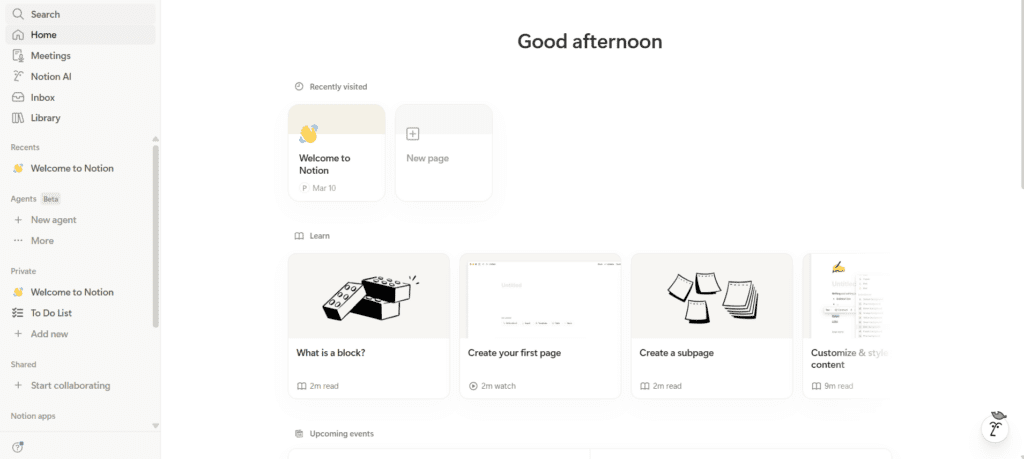
Notion
Notion is the ultimate “everything” tool. It’s your notes, your project manager, your company wiki, and sometimes even your website.
Official Website: Visit Notion
- Key Features:
- Databases: Create custom trackers for anything (tasks, inventory, content).
- AI Assistant: Helps you summarize meetings or write first drafts.
- Templates: Thousands of free templates to get you started.
- Who should use it: Every startup that needs a central “brain.”
- Real-life use case: A remote team uses Notion as their “Virtual Office.” Every project has its own page, every meeting is recorded there, and new employees go there to learn how the company works.
Pricing: * Free: For individuals.
- Plus: $10/user/month (For teams).
(Note: Prices may vary; please check their official website for current rates.)
| Pros | Cons |
| Replaces 3-4 other paid tools | Can become a “mess” if not organized |
| Extremely flexible | The mobile app is sometimes slow |
| Great for internal documentation | “Database” logic has a learning curve |
6. Communication & Team Tools
If you can’t talk to your team or your customers, you don’t have a business.
TidyCal
Subscription fatigue is real. TidyCal is the “Calendly killer.” Instead of paying $12/month forever to let people book meetings with you, you pay once and you’re done.
Official Website: Visit TidyCal
- Key Features:
- Syncs with Everything: Google, Outlook, Apple Calendar.
- Paid Bookings: Accept payments (via Stripe/PayPal) before someone can book a consultation.
- Simple Interface: No fluff, just a clean booking page.
- Who should use it: Consultants, founders, or anyone who takes more than 2 meetings a week.
- Real-life use case: A business coach switched from Calendly to TidyCal. They saved $144 a year and noticed that their clients actually preferred the simpler TidyCal interface.
Pricing: * Lifetime: $29 (One-time payment).
(Note: Prices may vary; please check their official website for current rates.)
| Pros | Cons |
| No monthly fees (Lifetime deal) | Fewer “fancy” branding options |
| Very fast and lightweight | Doesn’t have “Round Robin” scheduling |
| Includes payment collection | Limited “workflows” (reminders) |
Slack (Free Version)
You probably already know Slack, but many startups think they have to upgrade to the paid version early. You don’t. The free version is incredibly powerful if you know its limits.
Official Website: Visit Slack
- Key Features:
- Huddles: Quick audio/video calls without needing a Zoom link.
- Integrations: Connect your other budget tools (like Make or Tally) to get alerts.
- Canvas: A built-in place to store quick notes inside a channel.
- Who should use it: Any team of 2 or more people.
- Real-life use case: A small dev team uses the free version of Slack. They use the “90-day history” limit as a feature—it forces them to move important permanent information into Notion, keeping Slack only for “quick chat.”
Pricing: * Free: 90 days of message history (Perfect for early startups).
(Note: Prices may vary; please check their official website for current rates.)
| Pros | Cons |
| Industry standard communication | Free version deletes history after 90 days |
| Thousands of integrations | Can be a major distraction |
| “Huddles” are great for remote teams | Paid version is quite expensive per user |
Mistakes Startups Make When Choosing Tools
- Buying for the Future Self: Don’t buy the Scale plan because you might have 10,000 customers next year. Buy what you need for the 10 customers you have today.
- Ignoring Lifetime Deals: Check sites like AppSumo (where TidyCal comes from). You can often find incredible software for a one-time payment of $50 instead of a monthly subscription.
- Overlapping Features: I’ve seen startups paying for Slack, Zoom, and Google Meet. Choose one for video calls and cut the rest.
FAQs
1. Is Free software actually safe for my startup’s data?
Usually, yes. Tools like Notion, Slack, and Canva are multi-billion dollar companies with high security standards. However, always use Two-Factor Authentication (2FA) on every account.
2. When should I finally upgrade to a paid plan?
Upgrade when the imitation of the free plan is costing you more in time than the subscription costs in money. If you’re spending 2 hours a week manually moving data because you hit a free limit, it’s time to pay.
3. Do I really need an SEO tool right away?
If you plan to use content marketing to grow, yes. It’s better to spend $20/month now on Mangools to make sure you’re writing about the right things, rather than spending 100 hours writing articles that no one will ever find.
4. Can I use these tools if I’m not a tech person?
Absolutely. Tools like Tally, Carrd, and Canva were built specifically for people who are not developers or designers.
5. How do I keep track of all these subscriptions?
Use a simple spreadsheet (or a Notion page!) to list every tool, the monthly cost, and the Renewal Date. Review this list every 3 months and cancel anything you haven’t used in the last 30 days.
Practical Conclusion: How to Build Your Stack
Choosing your startup’s tech stack shouldn’t be a week-long research project. It should be a series of quick, practical decisions.
My advice? Follow the “Rule of One”:
- Pick one place to store your brain (Notion).
- Pick one place to talk (Slack).
- Pick one way to get customers (Framer + SEO or Social).
If you are just starting out, your total software bill should be under $100 a month. Use the free versions until they hurt. Focus your money on your product and your customers. The tools are just there to help you move faster.
What’s the first tool you’re going to set up? If you’re still not sure which one fits your specific business model, let me know what you’re building, and I can give you a more tailored recommendation.
For more practical startup tools and guides, you can also check out BizSmartTools. 🚀
0 Comments