






You’ve done the hard work. You’ve built the website, filmed the videos, or spent hours writing the perfect blog post. You see the traffic numbers climbing in your dashboard—100 visitors, 500 visitors, maybe even a thousand. But then you look at your bank account, and… nothing. No sales. No commissions. Just a ghost town.
This is the Silent Death of digital marketing. Most people visit your site, find what they need, and leave. They will never come back. They will forget your name within three minutes. You are essentially pouring water into a bucket full of holes.
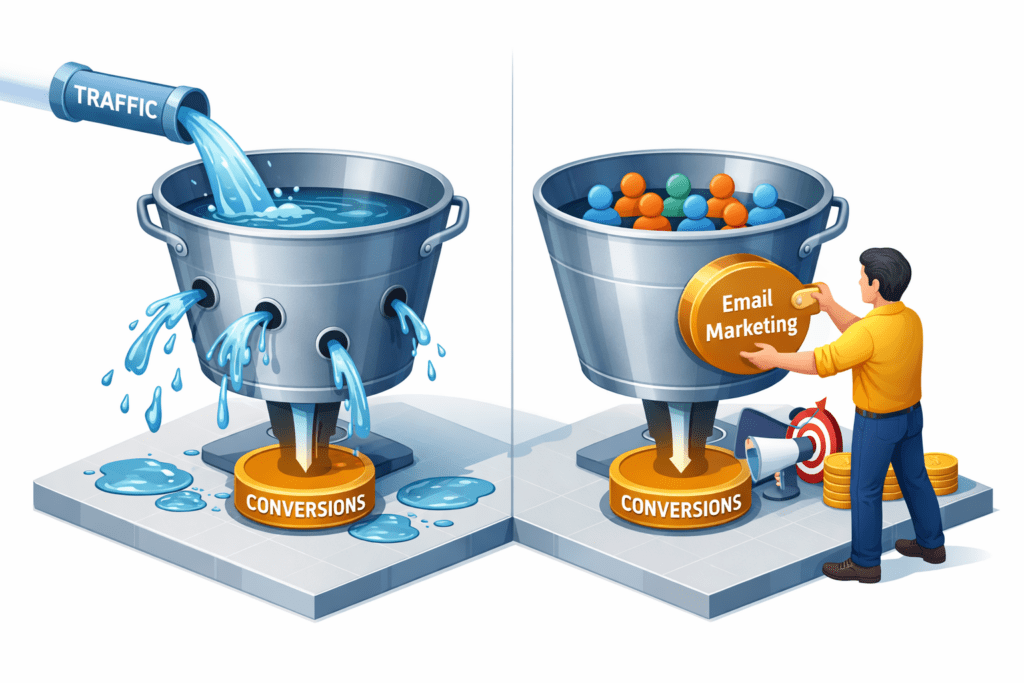
The only way to plug those holes is by choosing the best email marketing tools for beginners to capture leads and build trust. Think about it: Why would someone buy from you the very first time they see you? In a world full of scams and noise, trust isn’t built in a single click. It’s built over time, through multiple touchpoints.
Email marketing is how you plug those holes. It is the only marketing channel that you truly own. Algorithms change, Google updates its search rules, and social media reach drops to zero—but your email list is yours forever. It is the only way to turn a one-time visitor into a lifelong customer.
In this guide, we aren’t going to talk about fancy enterprise features that cost $500 a month or technical jargon that requires a computer science degree. We are going to talk about how you, as a beginner, can pick the right tool, set it up in an afternoon, and actually start making money while you sleep.
Why Most Beginners Fail – The Brutal Truth
Before we look at the tools, we have to address why most people fail. It isn’t because they picked the wrong software. It’s because of these three psychological and technical traps:
1. The Complexity Paralysis
Beginners often sign up for a tool like Salesforce or HubSpot because a guru recommended it. These tools are powerful, but they are built for teams of 50 people. A beginner gets lost in the settings, gets frustrated, and quits before sending a single email. If you spend three weeks trying to figure out how to tag a subscriber, you aren’t marketing; you’re just procrastinating.
2. Treating the Inbox Like a Billboard
Most beginners start their email list and immediately start screaming BUY MY STUFF in every subject line. This is the fastest way to get marked as spam. Email is a private conversation. If you wouldn’t walk up to a stranger in a coffee shop and shout your price list at them, don’t do it in an email.
3. The Free Tier Trap
Many beginners choose a tool solely based on it being 100% free forever. While free is good, some free versions limit your ability to send Automations—which are the literal engine of your sales. If your tool doesn’t let you send an automatic welcome sequence, you are manually doing work that should be done while you sleep.
4. The Value-to-Pitch Ratio Imbalance
Most beginners either sell too much or—surprisingly—too little. They spend months sending tips without ever asking for a sale, or they send nothing but sales pitches. Beginners fail because they haven’t mastered the 80/20 Rule: 80% of your emails should provide pure value (education, entertainment, or inspiration), and only 20% should be a direct sales pitch. If you don’t find this balance, your subscribers will either stop opening your emails or forget you have anything to sell.
5. Lack of a Compelling Lead Magnet
The biggest technical-strategic trap is not giving people a reason to sign up. Many beginners put a box on their site that says Join my newsletter. In 2026, nobody wants more news in their inbox. Beginners fail because they don’t offer a specific bribe—like a PDF, a checklist, or a discount code—in exchange for the email. Without a compelling Lead Magnet, even the best email tool is useless because your list will grow at a snail’s pace.
What Beginners Actually Need in an Email Tool
Forget the 500+ integrations, the fancy heatmaps, and the over-hyped AI predictive tools. As a beginner, you need a lean, mean, conversion machine. If you are starting out, you need exactly six things to be successful:
1. A Clean Visual Automation Builder
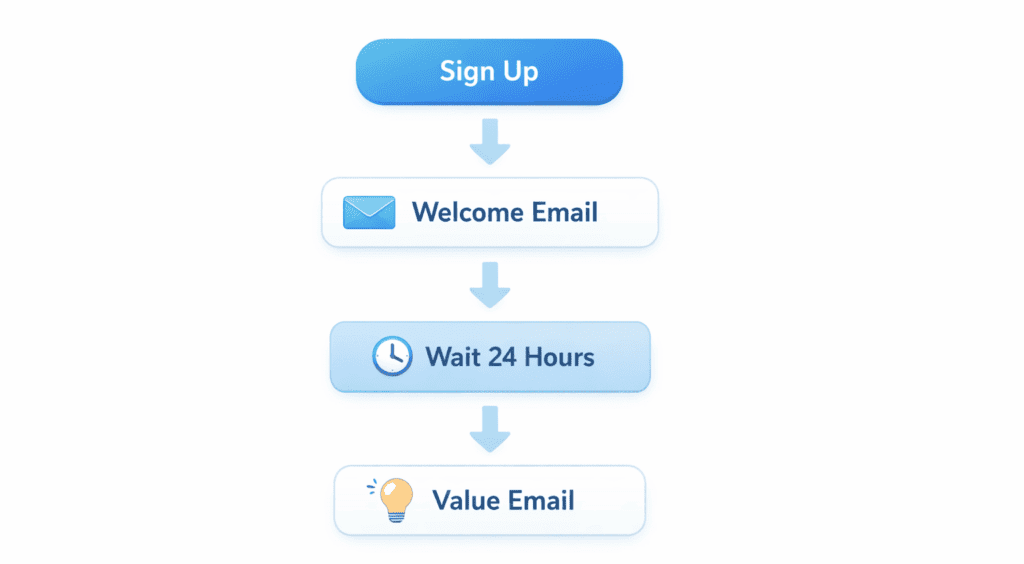
You need to be able to see a map of your customer’s journey. A visual builder allows you to draw a path: If a user joins my list -> Wait 24 hours -> Send Email 1 -> If they click the link, send Email A; if not, send Email B. If you cannot visualize the flow, you will get lost in the logic and your marketing will feel disjointed.
2. High Deliverability
This is non-negotiable. If your emails land in the Promotions tab or, heaven forbid, the Spam folder, you are effectively invisible. The tool you choose must have a world-class reputation with major providers like Gmail, Yahoo, and Outlook. You are paying for the tool’s delivery trucks to make sure your message actually reaches the front door of your subscriber.
PRO-TIP: Avoid using words like “Free,” “Cash,” or “Urgent” in ALL CAPS in your subject lines. Major email providers like Gmail often flag these as spam, which can hurt your deliverability rates.
3. Simple Form and Landing Page Builders
Most beginners do not have the budget to hire a web designer. Your email tool should include a built-in drag-and-drop builder for both sign-up forms and full-length landing pages. This allows you to go from a business idea to a live, lead-collecting webpage in under thirty minutes without touching a single line of code.
PRO-TIP: Your landing page should pass the “2-Second Test.” A visitor should understand exactly what you are offering and why they should care within two seconds of landing on the page. Keep your headline bold and your benefit clear.
4. Transparent and Scalable Pricing
You do not want a surprise $100 bill the moment you cross 1,001 subscribers. Many tools have hidden tiers or charge extra for basic features like automation. You need a tool with a clear growth path so you can calculate exactly how much your overhead will be as your business becomes more successful.
5. Seamless Segmentation and Tagging
As your list grows, you cannot treat everyone the same. If someone has already purchased your Beginner Course, you should not keep sending them emails asking them to buy it. You need a tool that lets you tag users based on their interests or actions. This allows you to send highly personalized messages to specific groups, which is the secret to getting a high conversion rate.
6. Ease of Use – The Intuition Factor
If the interface looks like a cockpit of a fighter jet, you won’t use it. The best tool is the one you actually log into every day to write. You need an editor that feels as simple as writing a document in Google Docs or Word. If the technology feels like a hurdle, it will kill your creative consistency.
PRO-TIP: Write your emails as if you are talking to one single friend. Avoid using corporate language like “To our valued subscribers.” Use “I” and “You” to make the reader feel like the email was written specifically for them.
The Top 5 Best Email Marketing Tools for Beginners
Choosing your first email tool is like choosing the foundation for a house. If you get it wrong, moving everything later is a massive headache. Here is a breakdown of the best options in 2026, categorized by who they serve best.
1. MailerLite: The King of Simplicity and Value
MailerLite is the goldilocks of email marketing. It isn’t too complex, and it isn’t too expensive. Most tools hide their best features (like automation and landing pages) behind a high-priced paywall. MailerLite gives you almost every professional tool for free up to your first 1,000 subscribers.
- Who it is best for: Niche bloggers, small business owners, and side-hustlers who want a clean, modern look without a steep learning curve.
- The Beginner’s Advantage: Their drag-and-drop editor is incredibly intuitive. If you can use Canva or Gmail, you can build a beautiful newsletter here.
Real-World Scenario:
The Houseplant Blogger Sarah runs a blog about indoor gardening. She has traffic but isn’t making money.
- The Hook: She uses MailerLite to build a Houseplant Rescue Checklist.
- The Entry: She places a simple Slide-in form at the bottom of her high-traffic blog posts.
- The Automation: When a user signs up, MailerLite triggers a Welcome Series. Day 1 delivers the checklist. Day 3 sends a tip on soil health. Day 5 introduces Sarah’s favorite organic fertilizer.
- The Conversion: The Day 5 email contains an affiliate link to a $30 fertilizer. Because Sarah provided value first, her subscribers trust her recommendation.
- Realistic Results: With just 500 subscribers, Sarah can expect to generate $100–$200 per month in passive affiliate sales.
Pros & Limitations
- Pros: Clean UI; Very affordable paid plans; High-quality landing page builder.
- Limitations: They have a strict manual approval process. You must have a live, professional-looking website before they approve your account to prevent spammers.
2. ConvertKit: The Creator’s Powerhouse
ConvertKit was built by creators, for creators. It ignores the fluff of heavy graphic design and focuses on what actually makes money: deliverability and automation. It treats your subscribers as people, not just email addresses, using a powerful tagging system.
- Who it is best for: YouTubers, Podcasters, Course Creators, and serious Bloggers who plan to sell digital products.
- The Beginner’s Advantage: It focuses on plain-text emails. These feel more personal and are less likely to end up in the “Promotions” tab of Gmail.
Real-World Scenario:
The YouTube Video Editor Mark teaches video editing on YouTube. He wants to sell a $97 Masterclass.
- The Hook: He offers a Free LUTs Pack (color presets) in his video descriptions.
- The Entry: The link leads to a simple, high-converting ConvertKit landing page.
- The Tagging: Mark sets a rule: Anyone who downloads the LUTs is tagged as Intermediate Editor.
- The Conversion: Instead of emailing his whole list, he sends a 4-day sales sequence only to the people with the Intermediate Editor tag.
- Realistic Results: Because the offer is highly targeted, Mark sees a 40%+ open rate and makes 5–10 sales ($485–$970) within a week.
Pros & Limitations
- Pros: Best-in-class automation logic; Excellent deliverability; Paid Creator Network helps you get free subscribers from other creators.
- Limitations: The free plan does not include automated sequences; The visual email designer is very basic.
3. Brevo: The Scalable All-in-One
Brevo is the disruptor in the industry. While others charge you more as your list grows, Brevo charges you based on the number of emails you send. This is a game-changer for businesses that have a lot of contacts but don’t email them every single day.
- Who it is best for: Local businesses (Gyms, Salons, Bakeries), E-commerce shops, and anyone with a massive list on a tiny budget.
- The Beginner’s Advantage: It’s a Business Toolbox. You get Email, SMS, WhatsApp marketing, and a CRM all in one place.
Real-World Scenario:
The Local Pet Groomer A local shop has 2,000 customers but only sends one monthly update.
- The Strategy: Instead of paying $50/month on other platforms for 2,000 names, they use Brevo’s free/low-cost tier.
- The Automation: They set up Transactional Emails. When someone books an appointment on their site, Brevo sends a confirmation and a reminder.
- The Conversion: Once a month, they send a Birthday Coupon to every pet owner.
- Realistic Results: This simple automation keeps the shop fully booked, adding an extra $500–$1,000 in monthly revenue with zero manual work.
Pros & Limitations
- Pros: Unlimited contacts on all plans; Best price-to-volume ratio; Includes SMS and Chat features.
- Limitations: The interface can feel a bit clunky and corporate compared to the sleek design of MailerLite.
4. GetResponse: The Sales Funnel Specialist
If your goal is to build a complex sales funnel—including webinars and paid ads—without leaving your email dashboard, GetResponse is your tool. It is designed for high-conversion marketing.
- Who it is best for: Affiliate marketers, Coaches, and anyone running paid ads (Facebook/Google) to capture leads.
- The Beginner’s Advantage: Their Funnel feature guides you through the process of building a lead magnet, a sales page, and an email sequence in one connected flow.
Real-World Scenario:
The Fitness Coach A coach wants to sell a $500 12-week transformation program.
- The Strategy: They host a free 30-minute webinar on How to lose 5lbs in 30 days.
- The Entry: GetResponse manages the registration page and the automated reminders.
- The Funnel: After the webinar, GetResponse automatically sends a Replay link to those who missed it and a Sign up now link to those who watched.
- Realistic Results: High-ticket coaching usually converts at 2–5%. Selling just two spots from a small webinar results in $1,000 in revenue.
Pros & Limitations
- Pros: Built-in webinar hosting; AI email generator; Powerful Auto-funnel builder.
- Limitations: The pricing gets expensive very quickly as you move into the pro tiers; It can be overwhelming for a casual hobbyist.
5. Mailchimp: The Integration Giant
Mailchimp is the most recognized name in the world of email. While it has become more expensive lately, it remains the standard for e-commerce because it connects to virtually every app on the planet.
- Who it is best for: Shopify or Etsy store owners who want set it and forget it e-commerce automations.
- The Beginner’s Advantage: The Creative Assistant tool uses AI to automatically pull colors and logos from your website to design your emails for you.
Real-World Scenario: The Etsy Jewelry Maker An artist selling handmade earrings.
- The Strategy: Connect Mailchimp to Shopify/Etsy.
- The Automation: Set up an Abandoned Cart email. If someone puts earrings in their cart but doesn’t buy, Mailchimp sends a friendly nudge 2 hours later with a 10% discount code.
- The Result: Abandoned cart emails are the highest-earning emails in the world.
- Realistic Results: Recovering just 3–5 sales a month that would have been lost can pay for the software five times over.
Pros & Limitations
- Pros: Massive library of professional templates; Best mobile app for tracking stats on the go; Integrates with everything.
- Limitations: The free plan is now very limited (only 500 contacts); It is generally more expensive than MailerLite or Brevo for the same features.
Real Conversion Examples: How the Money is Actually Made
Many beginners understand the theoretical concept of email marketing, but they struggle to visualize the actual journey from a subscriber clicking a button to money hitting their bank account. It often feels like there is a missing link between sending an email and receiving a sale notification. To bridge this gap, here are three realistic and proven blueprints that you can copy for your own business.
Example A: The Resource Vault (The Trust-First Strategy)
Best for: Bloggers, Educators, and Content Creators.
Imagine a blogger in the Personal Finance niche. Instead of a generic sign-up box that says Join my newsletter, they create a high-value Lead Magnet called The Ultimate 2026 Budget Tracker. This is a simple but polished Google Sheet that solves a specific problem.
- The Hook: Download the exact budget sheet I used to save my first 10,000 dollars.
- The Email Sequence:
- Email 1 (Immediate): Deliver the goods. No selling is involved here. Just the link to the sheet and a friendly welcome.
- Email 2 (Day 2): The Quick Win. You ask, Did you open the sheet? and then provide one hidden trick to find an extra 100 dollars in monthly expenses. This builds massive credibility.
- Email 3 (Day 5): The Soft Pitch. You mention, I noticed many of you are using the tracker to save for investing. I wrote a 50-page guide on Investing for Absolute Beginners. You can grab it here for 27 dollars.
- The Conversion Logic: By the time the subscriber sees the 27-dollar offer, they have already received a valuable tool and a money-saving tip for free. You are no longer a stranger; you are a helpful mentor.
- The Result: A typical website conversion rate is only 1 percent. However, an email sequence like this often sees conversion rates of 5 to 7 percent because the cold visitor has been warmed up through consistent value.
Example B: The Bridge Page, The Education-Based Affiliate Sale
Best for: Affiliate Marketers and Tech Reviewers.
An affiliate marketer wants to earn commissions by recommending a specific website builder. Instead of just spamming their link on social media, they use a strategic email sequence.
- The Hook: A Free Checklist: 10 Things your website needs before you hit launch.
- The Email Sequence:
- Email 1: Deliver the Checklist PDF immediately.
- Email 2: Problem Identification. You explain that most beginners choose the cheapest hosting and regret it when their site crashes. You teach them what to look for in a reliable host.
- Email 3: The Solution. You say, I have tested twelve different builders, and I use this specific tool because it saves me four hours of design work every week. If you use my link, I will even send you a free video tutorial on how to set it up.
- The Conversion Logic: Instead of just asking for a sale, you educated the user on the importance of quality. By adding a bonus tutorial, you made buying through your link the most logical choice.
- The Result: High-quality affiliate sales with much lower refund rates because the customers actually know how to use the product.
Example C: The Abandoned Cart Recovery For E-commerce
Best for: Shopify, Etsy, or WooCommerce Store Owners.
This is the most common way money is made in the e-commerce world. It targets people who were “almost” ready to buy but got distracted.
- The Hook: A user adds a handmade leather wallet to their cart but closes the website before paying.
- The Email Sequence:
- Email 1 (After 1 Hour): A friendly reminder. Did you forget something? We have saved the items in your cart for you.
- Email 2 (After 24 Hours): Adding an incentive. We noticed you are still thinking about it. Here is a 10 percent discount code that expires in 48 hours to help you decide.
- Email 3 (After 48 Hours): Creating urgency. This is your last chance to use your discount before your cart is cleared.
- The Conversion Logic: People are busy. Sometimes they just need a nudge or a small discount to pull the trigger.
- The Result: Abandoned cart emails typically recover 10 to 15 percent of lost sales, which can add thousands of dollars to your yearly revenue.
Comparison Table: Which Beginner Tool Wins?
When you are starting out, you don’t need a thousand features; you need the right features at the right price. Use this table to quickly compare your options.
| Feature | MailerLite 🟢 | ConvertKit 🔵 | Brevo 🟠 | GetResponse 🔴 | Mailchimp 🟡 |
| Best For | All-rounders | Creators | High Volume | Sales Funnels | E-commerce |
| Free Plan | 1,000 Subs ✅ | 1,000 Subs ✅ | Unlimited Contacts 🔥 | 500 Subs ⚠️ | 500 Subs ⚠️ |
| Ease of Use | ⭐ 10/10 | ⭐ 9/10 | ⭐ 7/10 | ⭐ 8/10 | ⭐ 9/10 |
| Automations | Included Free 🚀 | Paid Only | Included Free 🚀 | Paid Only | Basic Only |
| Pricing Model | Per Subscriber | Per Subscriber | Per Email Sent | Per Subscriber | Per Subscriber |
| Final Score | 🏆 Winner | 🥈 Creator’s Choice | 🥉 Budget King | Funnel Expert | All-Rounder |
How to Go from Zero to Your First Sale: The Actionable Roadmap
This is the exact 5-step framework used by top digital marketers to launch new brands. Don’t skip any steps.
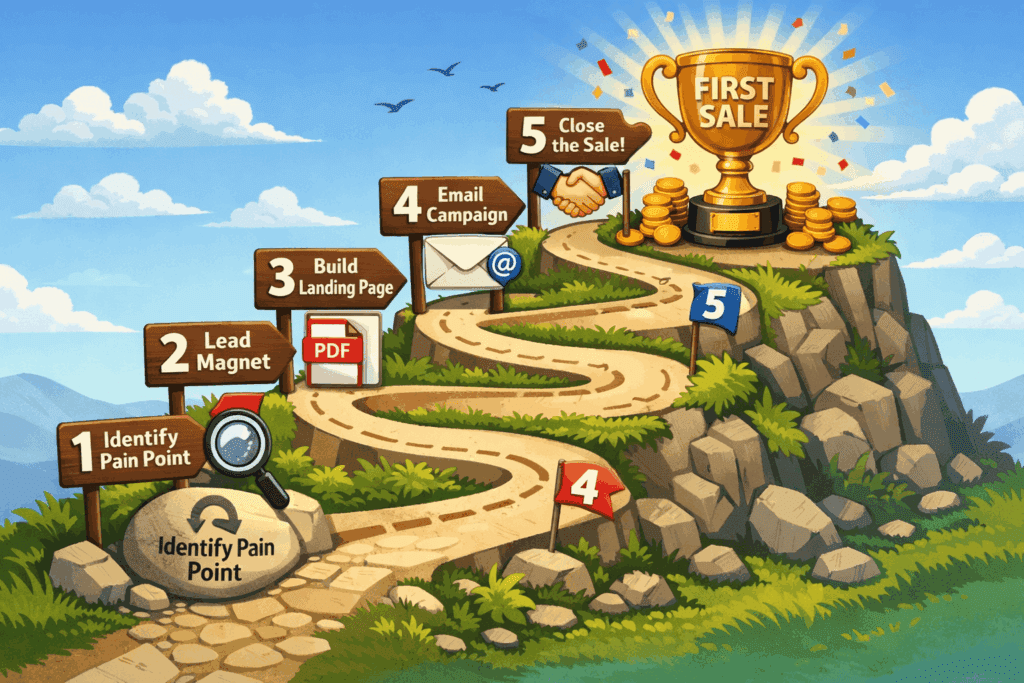
Step 1: Identify a High-Value Pain Point
You aren’t selling a product; you are selling a solution. What keeps your audience up at night?
- Example: Instead of “How to Train a Dog,” focus on “How to stop your dog from barking at 3 AM.“
- The Goal: Find a problem so specific that someone would feel relieved just knowing a solution exists.
Step 2: Create your Lead Magnet
The biggest mistake beginners make is spending months writing a 100-page ebook. Nobody has time to read that.
- The Strategy: Create a 2-page PDF, a checklist, or a 5-minute video.
- The Rule: It must deliver a “Quick Win.” If they can read your lead magnet and solve a tiny part of their problem in 10 minutes, they will trust you forever.
Step 3: Build Your Minimum Viable Landing Page
You don’t need a full website. You need a distraction-free landing page.
- The Layout: Use a bold headline (The Promise), three bullet points (The Benefits), and one email opt-in box.
- The Secret: Remove all navigation links (Home, About, Contact). Your visitor should have only two choices: Sign up or leave.
Step 4: Set Up the Money-Making Automation
Write your 3-email sequence before you ever drive traffic.
- Email 1 (The Delivery): Send the PDF immediately. Introduce yourself briefly and tell them what to expect next.
- Email 2 (The Bridge): Share a personal story of failure or a high-level tip. Show them that you understand their struggle.
- Email 3 (The Pitch): Introduce your product or affiliate offer as the logical “Next Step” to achieve their goals faster.
Step 5: Drive Intentional Traffic
Stop sharing your homepage. Every link you post on Instagram, YouTube, or your blog should point directly to your Landing Page. * Pro Tip: If you have 0 followers, join niche Facebook groups or Reddit forums. Don’t spam; answer people’s questions and offer your free lead magnet as an extra resource.
Common Mistakes Beginners Make
- Waiting for Perfection: You will never feel ready. The Perfect Tool doesn’t exist. Choose one, set it up, and iterate later.
- Buying Email Lists: This is the fastest way to get your account banned permanently. You cannot buy trust; you must earn it.
- Technical Over-Engineering: Don’t try to set up complex If/Then logic on Day 1. Keep your automation simple until you have at least 100 subscribers.
- Ignoring the Subject Line: If they don’t open the email, they can’t buy. Spend as much time on your subject line as you do on the actual email content.
PRO-TIP: If you send an important email and 80% of your list doesn’t open it, wait 48 hours and resend the same email to the “Unopens” with a different subject line. This simple trick can often double your total clicks.
Frequently Asked Questions
1. Is email marketing still relevant in 2026?
Yes. Social media algorithms are unpredictable. You can have a million followers today and zero reach tomorrow. Your email list is the only traffic source you truly own and control.
2. How many subscribers do I need before I start selling?
You can start selling with your very first subscriber. If you have a high-value product and a highly targeted lead, you don’t need a massive list to make a profit.
3. Do I need a professional business email address?
Yes. Using a @gmail.com or @yahoo.com address for bulk email marketing will often result in your emails going to the spam folder. Use a domain-based email (e.g., hello@yourwebsite.com) to ensure high deliverability.
4. How often should I email my list?
At a minimum, once a week. If you email too rarely, people forget who you are. If you email too often (more than once a day), they might get annoyed. Once or twice a week is the sweet spot for beginners.
Final Verdict: Which Tool Should YOU Choose?
At BizSmartTools, we believe that the best tool is the one that you actually use consistently. However, if you are still feeling stuck, here is our final expert recommendation based on your specific business model:
- Choose MailerLite if: You are a complete beginner on a budget and want a professional, modern experience for 0 dollars. It is the best balance of power and simplicity for bloggers and small business owners.
- Choose ConvertKit if: You are a Creator (Blogger, YouTuber, or Author) who wants to build a deep, segmented relationship with your audience through smart automations.
- Choose Mailchimp if: You run an e-commerce store on Shopify or Etsy and want the most robust visual designs and shopping cart integrations.
- Choose Brevo if: You already have a large list of past customers but only send emails occasionally. Their pay-as-you-go model will save you a fortune.
- Choose GetResponse if: You are an affiliate marketer or a coach ready to build serious sales funnels and host webinars to sell high-ticket services.
The most important step is to start today. Do not wait until you have 1,000 subscribers to set up your first automation. Set it up for your very first subscriber. Treat that one person like they are a thousand people. That is the secret to building an email list that doesn’t just sit there, but actually converts into a real business.
0 Comments